

STL Viewer app icon

STL Viewer: 3D Print Files

Check the size, volume and filament before you print.

Open STL, OBJ, 3MF and PLY models on your iPhone and iPad and see them in clear, smooth 3D. It works without internet, and your files are read on your device and never uploaded.

For iPhone and iPad with iOS 17 or later. No account, no sign-in.

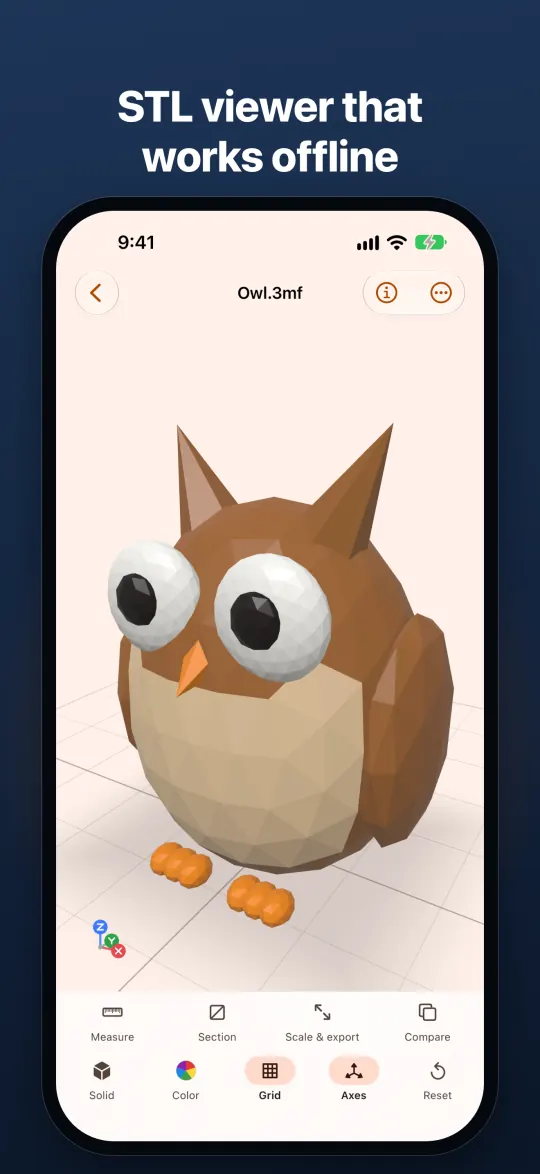
STL Viewer on iPhone showing a five-color owl model in solid view on a print bed grid with XYZ axes, with the Measure, Section, Scale and export and Compare tools below.
  • Works offlineViewing, model info and the filament estimate need no internet.
  • Files stay on your deviceModels are processed on your iPhone or iPad and never uploaded.
  • No accountNo sign-up and no sign-in. Open a file and start.
  • iPhone and iPadAn iPad layout with a side panel, dark mode and VoiceOver.
Screenshots

A 3D print file viewer that fits in your pocket

Real screens from the app with its own sample models. Tools marked Premium need the Premium upgrade.

  • STL viewer that works offline: the owl sample in solid view on the print bed.
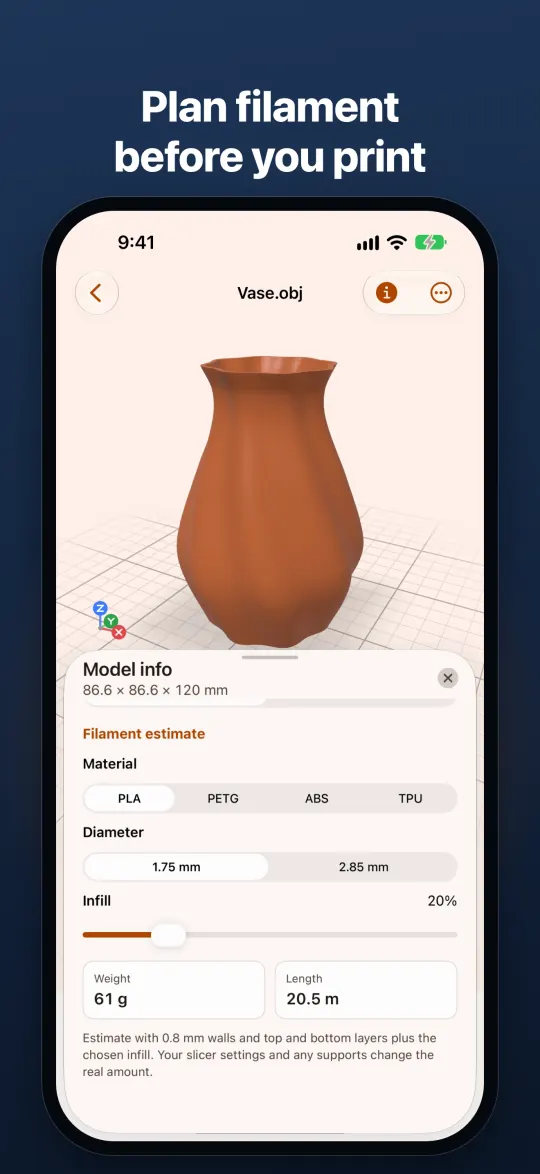
  • Plan filament before you print: model info for a vase, 86.6 by 86.6 by 120 mm, with a PLA filament estimate of 61 g and 20.5 m at 20 percent infill.
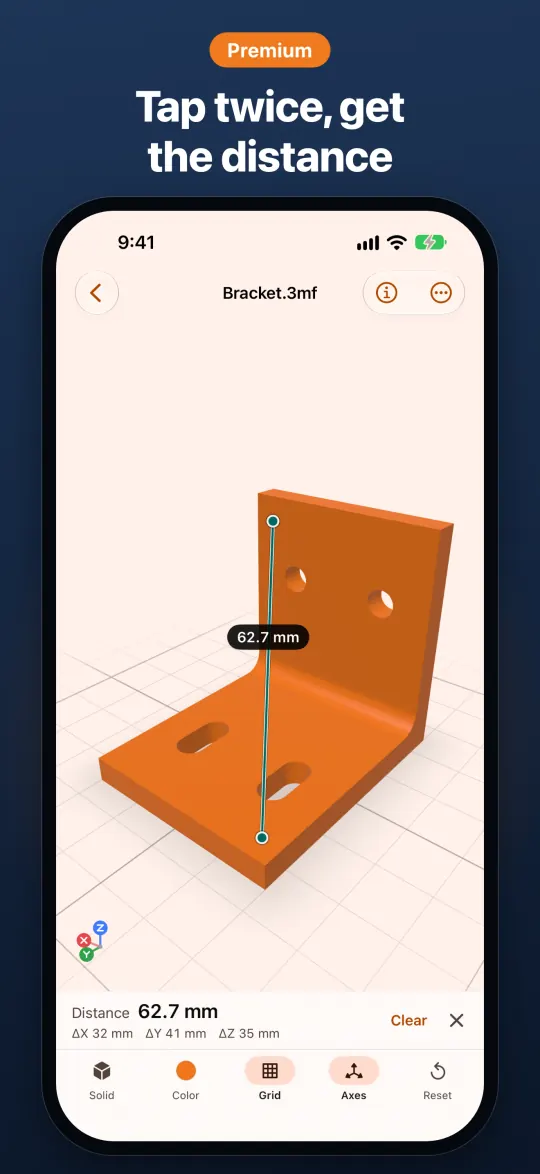
  • Premium, tap twice, get the distance: two points on a bracket 62.7 mm apart, with the X, Y and Z differences.
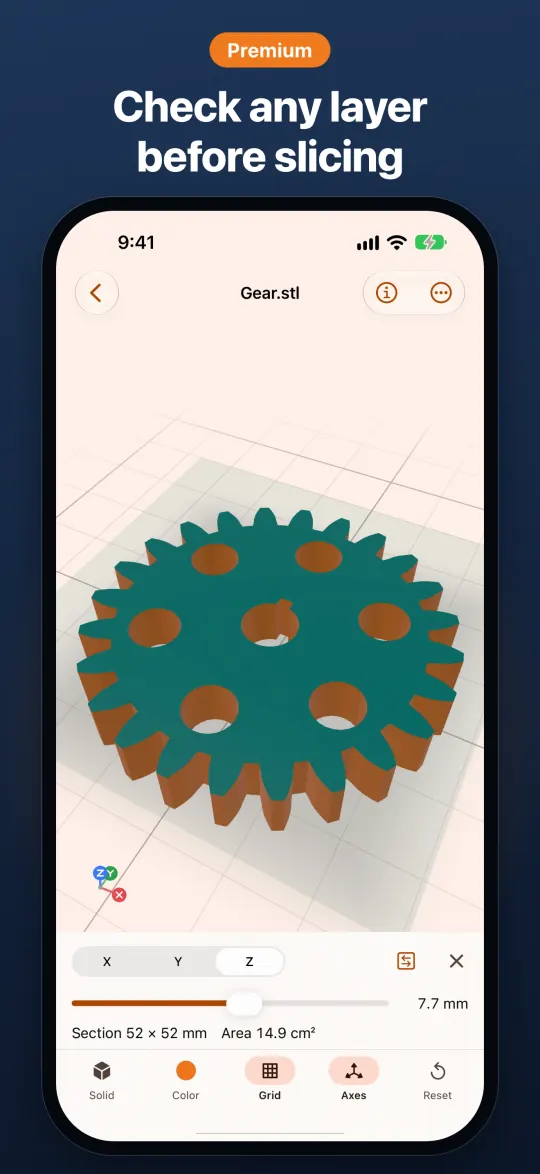
  • Premium, check any layer before slicing: a gear cut along Z with a solid cut face and the section's width, height and area.
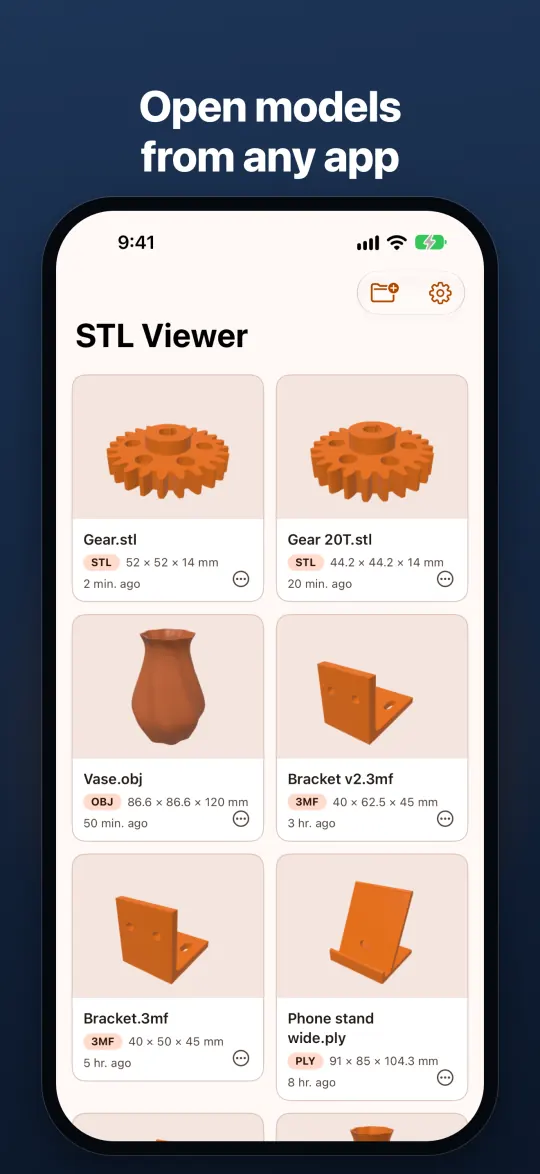
  • Open models from any app: recent STL, OBJ, 3MF and PLY files with 3D previews and the Open file button.
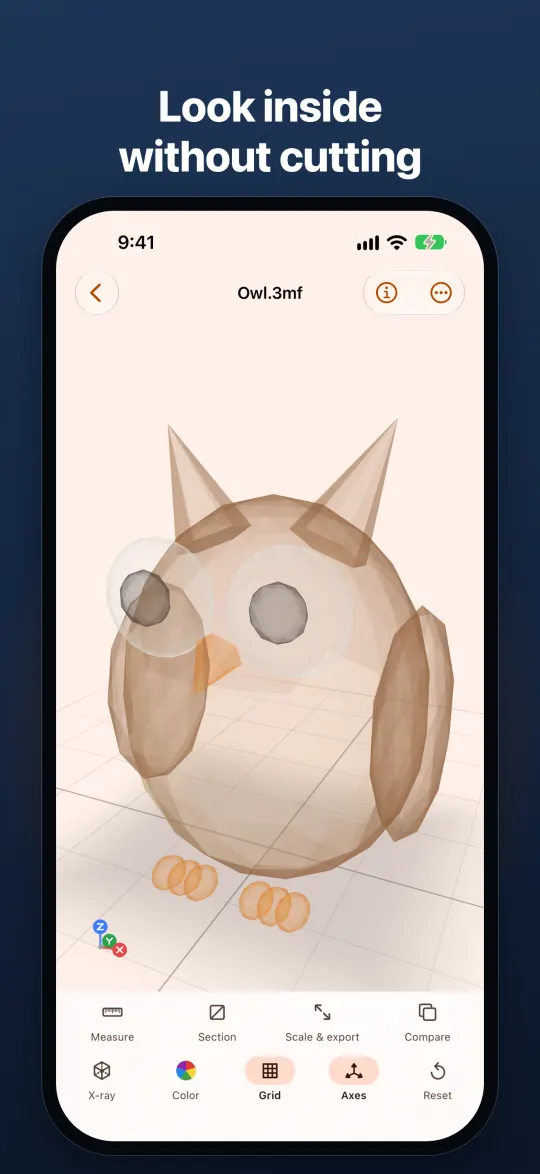
  • Look inside without cutting: the owl in x-ray view with its inner walls visible.
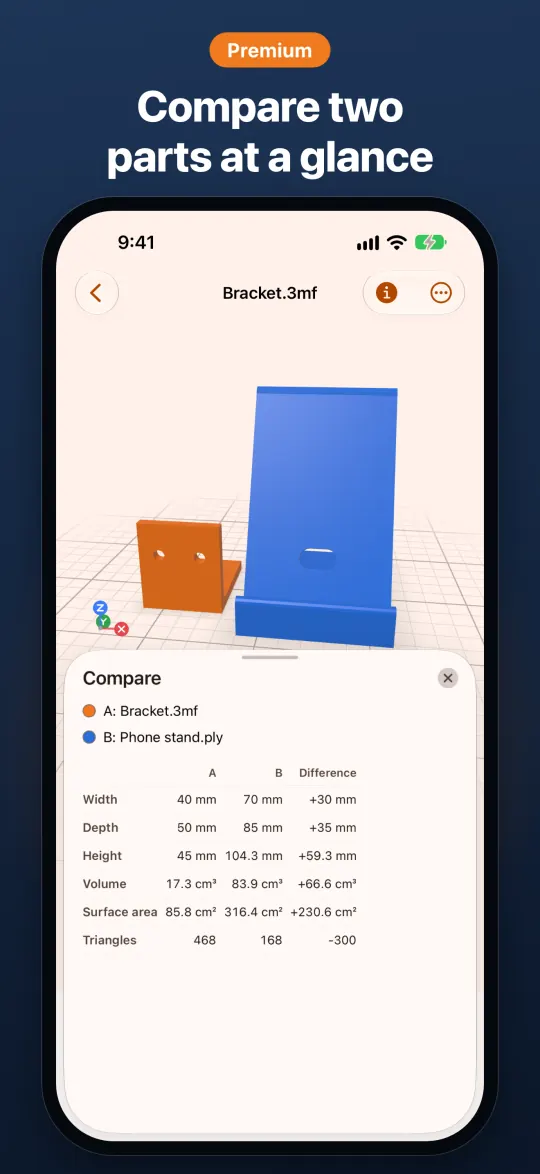
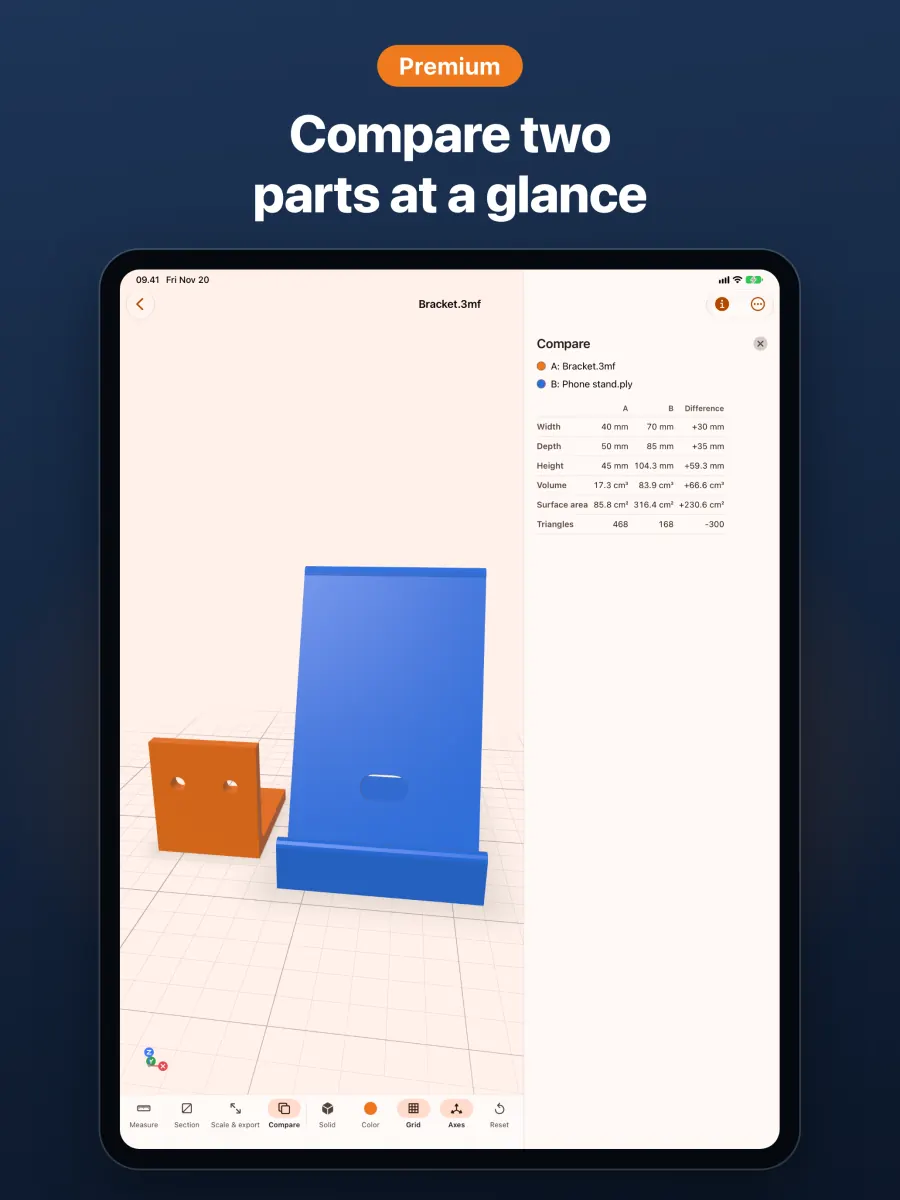
  • Premium, compare two parts at a glance: a bracket and a phone stand side by side with a table of their dimensions, volume and triangles.
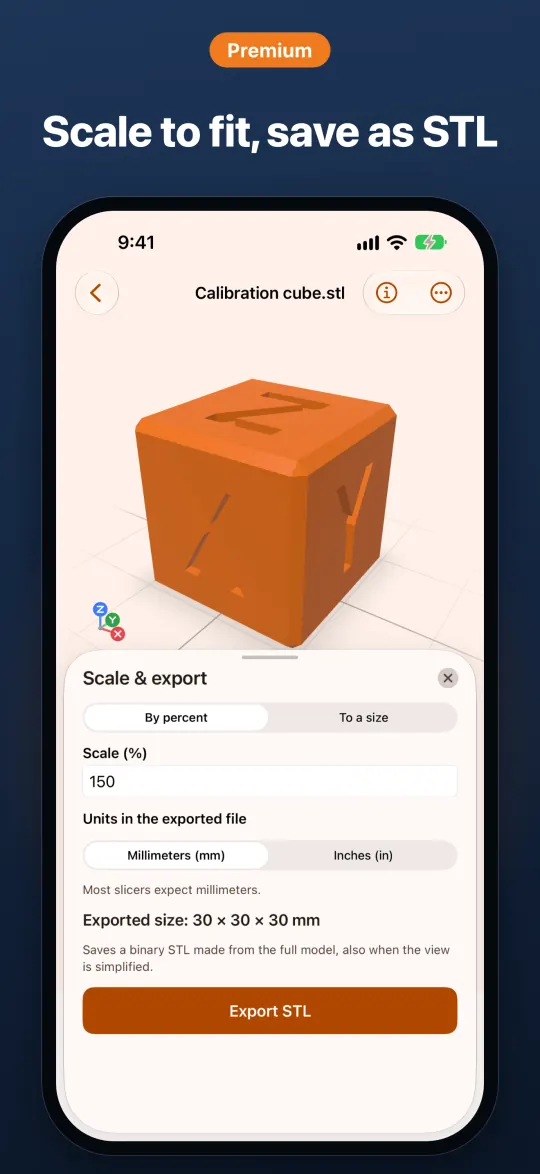
  • Premium, scale to fit, save as STL: a calibration cube scaled to 150 percent, 30 by 30 by 30 mm, with the Export STL button.

Swipe to see more screens.

Features

Everything you need to check a model before printing

Open a file from the Files app, from the share sheet, or with Open in from your mail, browser and cloud storage apps.

  • Smooth 3D view

    Solid, wireframe and x-ray views, a print bed grid and XYZ axes. One finger rotates, two fingers pan, pinch zooms and a double tap resets the view. Pick a model color or use the colors saved in the file.

  • Size, volume and filament

    Width × depth × height in mm or inches, volume, surface area, triangles and a closed (watertight) mesh check. The filament estimate gives weight and length for PLA, PETG, ABS or TPU, 1.75 or 2.85 mm, with an infill slider.

  • Premium

    Measure

    Tap two points on the surface to get the distance between them and the X, Y and Z differences.

  • Premium

    Section

    Cut along X, Y or Z with a solid cut face and see the section's width, height and area. Check walls and inner parts before you slice.

  • Premium

    Scale and export

    Scale by percent or to a target size, convert a model drawn in inches to millimeters, and save the result as a binary STL file.

  • Premium

    Compare

    Open a second model next to the first and compare their dimensions, volume and triangle count in one table.

  • Premium

    Save image

    Save the current view as a PNG image to share a model with a client, a classmate or your print shop.

  • STL, OBJ, 3MF, PLY and ZIP

    STL in binary and ASCII, OBJ with its MTL colors, 3MF and PLY. A ZIP download opens directly, with the largest model inside it. Large files load with progress and a Cancel button.

  • Private by design

    No account and no sign-in. Models are processed on your device and never uploaded; the developer has no server that could receive them.

Model info

Know what a print will take before you start.

The model info panel shows every number you need to decide whether a downloaded model fits your printer and your spool. On iPad it stays open next to the model.

  • Size as width × depth × height, in millimeters or inches
  • Volume, surface area, triangles, file size and format
  • Closed (watertight) mesh check
  • File units for STL, OBJ and PLY files drawn in inches
  • Filament weight and length for PLA, PETG, ABS or TPU

The filament amount is an estimate: it assumes a 0.8 mm solid shell (about two 0.4 mm lines) with your infill inside. Supports, brims and slicer settings change the real amount.
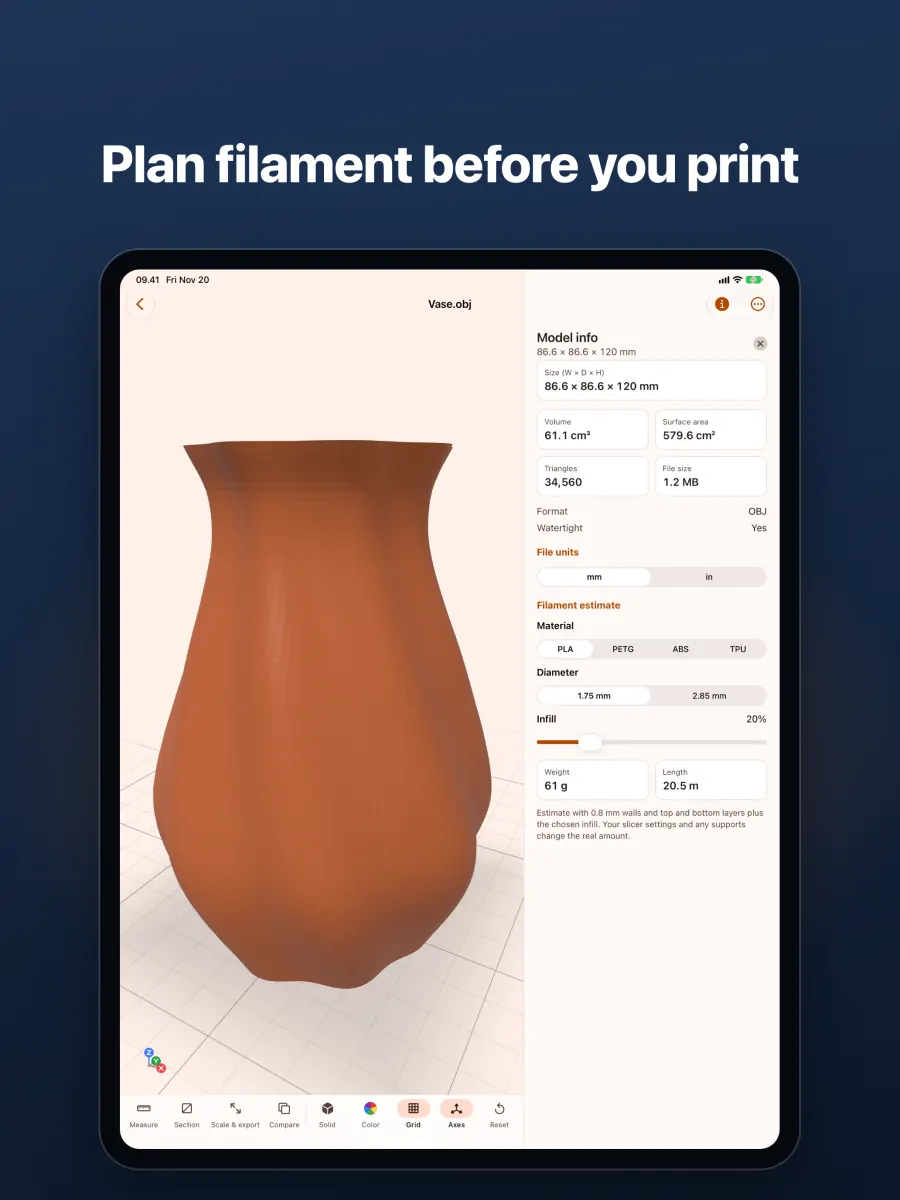
STL Viewer on iPad: a vase model with the model info panel at the side showing size, volume, surface area, triangles, file size, watertight, file units and the filament estimate.
Compare Premium

Two versions of a part, side by side.

Open a second model and both stand on the same print bed. A table lists each model's width, depth, height, volume, surface area and triangles, with the difference between them.

  • Check a remix against the original
  • See how much bigger a scaled copy came out
  • Review two design iterations on the shop floor
STL Viewer on iPad comparing an orange bracket and a blue phone stand on one print bed, with a table of their dimensions, volume, surface area and triangles.
Free vs Premium

Free to view. Premium for the tools.

Viewing, model info and the filament estimate are included for everyone. Premium adds the measuring and editing tools and removes the ads.

What is included without Premium and with Premium
Feature Free Premium
Open STL, OBJ, 3MF and PLY Also from ZIP archives✓✓
Solid, wireframe and x-ray views✓✓
Size, volume and filament estimate✓✓
Measure–Watch a short ad to measure once✓
Section–✓
Scale and export STL–✓
Compare two models–✓
Save image–✓
Recent files10 most recentUnlimited
AdsWith adsNo ads

Premium is a one-time Lifetime purchase or a Yearly subscription that renews automatically until you cancel it. Prices vary by country and are shown in the App Store and in the app before you buy. Use Restore Purchases to unlock Premium on your other devices with the same Apple Account.

Who it is for

Made for people who print, teach, sell and design

  • Makers and hobbyistsSee whether a downloaded model fits your print bed and how much filament it needs.
  • StudentsOpen class projects anywhere and look inside parts with cross-sections.
  • Sellers of 3D modelsPreview files and confirm dimensions and scale before you send or list them.
  • Engineers and designersReview parts on the shop floor and compare two versions.
FAQ

Frequently asked questions

Does the STL viewer work offline?

Yes. Viewing, model info and the filament estimate need no internet. A connection is used only for ads and purchases.

Which files can I open?

STL (binary and ASCII), OBJ, 3MF, PLY and ZIP archives that contain one of them. For STEP, glTF and other formats, export the model as STL, OBJ or 3MF from your design software first. G-code is not supported.

How do I open a model from another app?

Use Open file in the app to pick a model in the Files app, or choose STL Viewer from the share sheet or Open in of your mail, browser or cloud storage app. To see the colors of an OBJ file, select its MTL file together with the OBJ file.

Which units are used?

STL, OBJ and PLY files store no unit, so millimeters are assumed; switch a file to inches if it was drawn in inches. 3MF files declare their unit. Sizes are shown in millimeters or inches, as you prefer.

Why is the filament amount an estimate?

It assumes a 0.8 mm solid shell (about two 0.4 mm lines) and your infill inside. Supports, brims and slicer settings change the real amount.

What is free and what does Premium add?

Opening files, the 3D views, model info and the filament estimate are free. Premium adds Measure, Section, Scale and export, Compare, Save image, unlimited recent files and no ads. Without Premium you can choose to watch a short ad to measure once.

Are my files uploaded anywhere?

No. There is no account and no sign-in. STL Viewer processes your models on your device and never uploads them.

How do I get Premium on a new iPhone or iPad?

Premium is linked to your Apple Account. Sign in with the same Apple Account and use Restore Purchases in Settings or on the Premium screen.

Which devices are supported?

iPhone with iOS 17 or later and iPad with iPadOS 17 or later. On iPad, model info, export and compare open in a side panel next to the model.

Open your next print on your phone

Check the size, volume and filament of any STL, OBJ, 3MF or PLY model, wherever you are.

Download on the App Store